For care professionals
Stop signing in as the parents.
If you're a nanny, newborn care specialist, or postpartum doula, you know the drill: every family hands you their tracker password, and you log their baby's day as them. Milk Monster works the way your profession deserves — your own login, every family you work with under one account, your name on every entry, and a clean goodbye when a placement ends. And now you don't have to wait to be invited — you can set a family up yourself, on night one.
Next session — Wednesday, 1:30 PM Central
Walk through it live, with Erick.
A 45-minute live walkthrough on Zoom — set up a family before the baby arrives, hand it to the parents, keep every family under one login — plus whatever you want to ask. Every other Wednesday at 1:30 PM Central. Register once and the link covers every session.
Save your spotFree, and you can just listen. Sessions are recorded.
The walkthrough
See it, start to finish.
Erick walks you through the whole thing — your own login, a real edit and the history that keeps it, the one-tap shift handoff, and switching between the families you work with.

Trouble with the player? Watch on YouTube →
What makes it different
Six things built for the person on shift.
Most baby apps are built for two parents, then handed to whoever else turns up. These six exist because you do this for a living — and because the families you work for notice the difference.
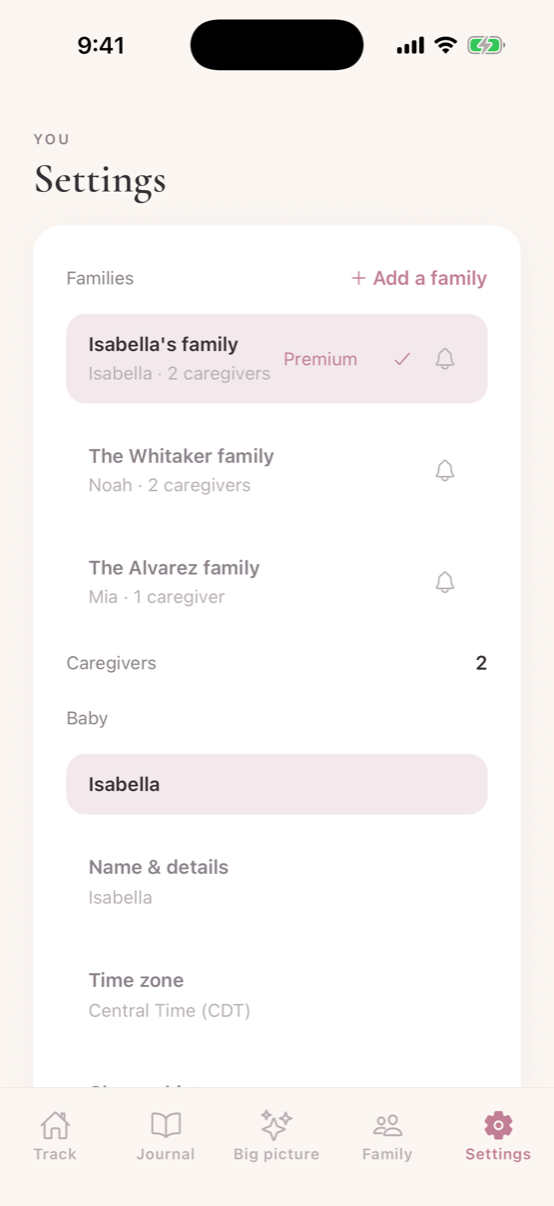
One account, every family
All your families, under one login.
Every household you work with sits in one list — the ones that invited you, and the ones you set up yourself. Tap a name to switch. You log for the baby in front of you, and it lands in that family's record under your name, never in the wrong chart.
No second app, no second password, no logging out at 2am to check which family you're in. When a placement ends you simply leave it — nothing to untangle.
Before the baby is here
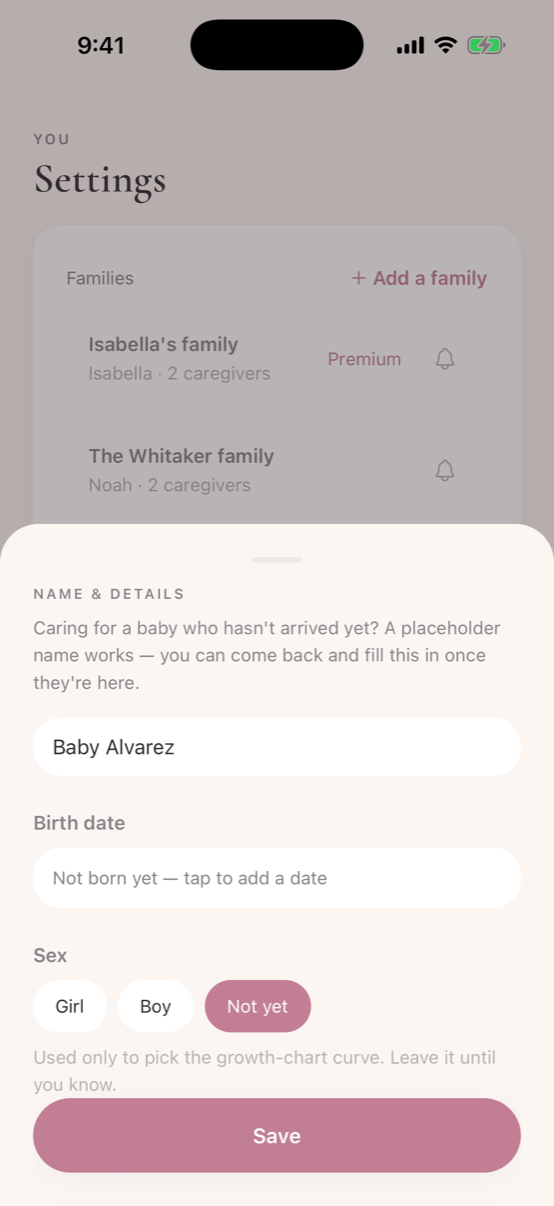
Set the family up while they're still expecting.
You don't have to wait for the birth. Create the family now with a placeholder — “Baby Alvarez” is fine — leave the birth date as “not born yet,” and invite the parents whenever you like. When the baby arrives you come back and fill in the real name and date. Sex is optional too; it only picks the right growth curve, so leave it until you know.
Walk into a contract with the log already built, the parents already added, and nothing to configure at 2am on night one. Hand it to the parents when you're ready and the family becomes theirs — their subscription then covers everyone on it.
You build it, then you hand it over
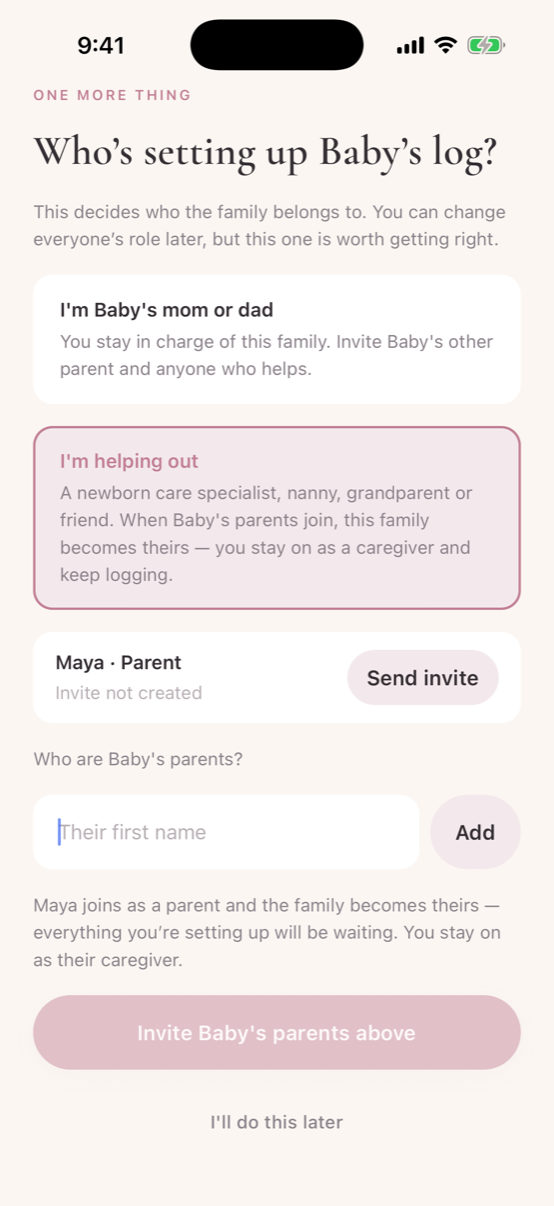
Set it up, then give the family to the parents.
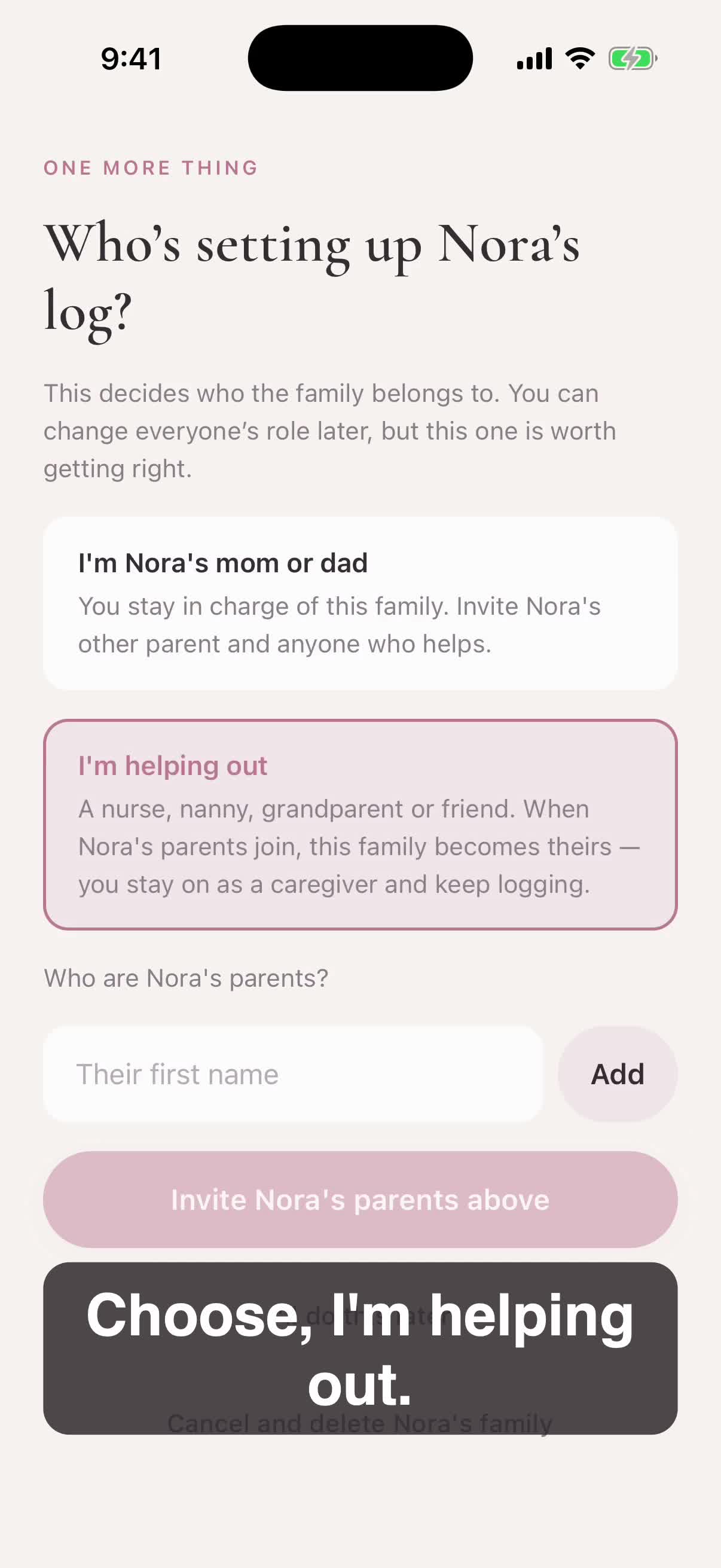
When you create a family the app asks one question: are you the parent, or are you helping out? Choose “I’m helping out” and add the parents by first name — the app makes each of them their own invite to send. The moment a parent joins, the family becomes theirs. Everything you set up is already waiting for them, and you stay on as their caregiver and keep logging.
It also means you are never holding a family’s account. They own their own data from the day they walk in, and their free week starts when they take it — not when you did the setup weeks earlier.
Never the parents' password
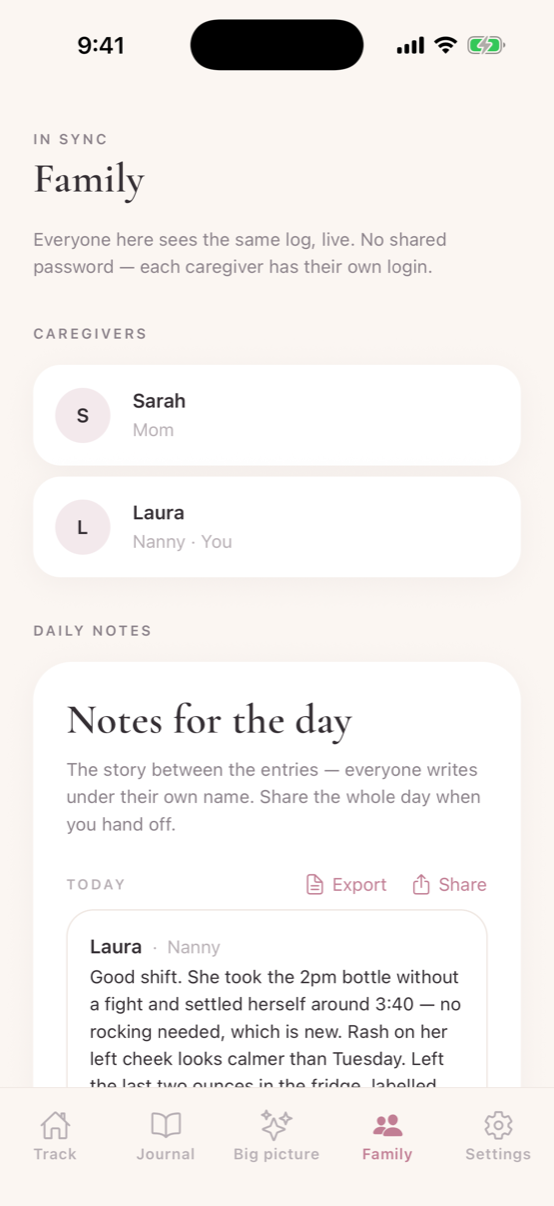
You sign in as you.
Not as the mother. Not as an account the whole agency shares. The family adds you, you appear on their roster with whatever they call you — Nanny, NCS, Grandma — and that name rides on everything you do. Underneath sits the note for the day: the part that never fits in the log, written in your own words.
Parents can read the day as it happens, from a laptop at the office. Most of them stop asking for the end-of-shift text once they realise that — which gives you the last ten minutes of your shift back.
Your work, protected
Every entry keeps your name on it.
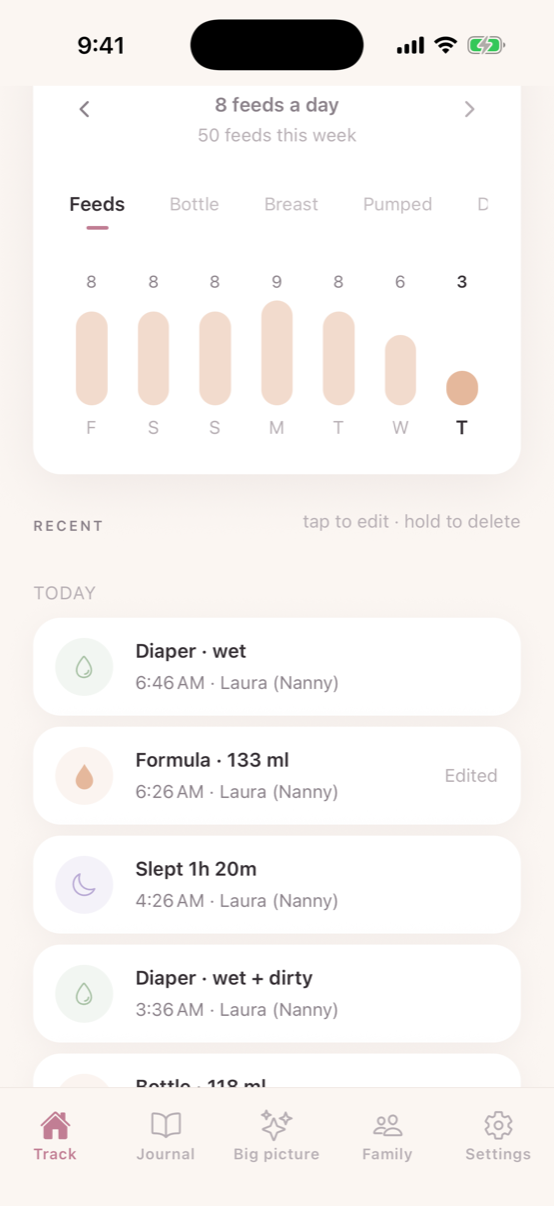
Each thing you log is signed. If anyone edits or removes an entry you made, the log says so plainly — what it was, what it became, and who changed it. That recording happens in the database underneath the app, so it can't be switched off or written around.
It protects the family exactly as much as it protects you, and that is the point: it turns a shared list into a record that would hold up in a conversation you'd rather not have.
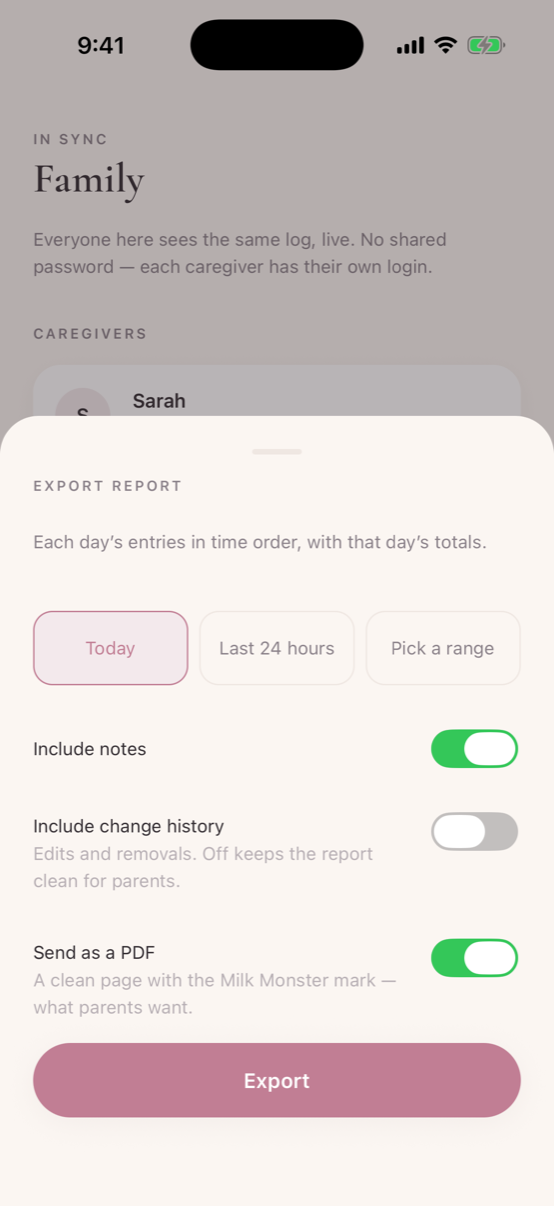
The end of the shift
The whole night, as one clean page.
One tap turns the shift into a report — today, the last 24 hours, or any range you choose. Send it as a PDF and the parents get a tidy page with your notes on it. Leave the change history off to keep it simple, or switch it on when the full record matters.
This is the one families talk about. It is the difference between a text at 7am and something they can forward to the pediatrician — and it is the reason a lot of parents pass your name along.
In the most popular trackers, "sharing" still means one shared login — the parents, and you, all signing in as the same person, in every family you work with. Milk Monster is built the other way around: caregivers are people, with their own logins, in as many households as they work with. See the comparison →
Export once a week, and always on your last day with a family. Once a placement ends and you're removed from the household, its log is no longer yours to open. Keep a copy as you go and your own record of the work stays in your hands.
The old way
Shared passwords aren't professional.
Holding a family's credentials means holding their whole account — their settings, their data, everything. Nothing says who actually logged what. And when the placement ends, the only way they can take access back is changing their password. Everyone deserves better than that — you included.
New
Setting one up yourself, start to finish.
Two minutes on the phone: making your own account, creating the family on night one, choosing “I’m helping out” so it becomes the parents’ the moment they join, and logging a bottle and a change — with your name on every entry.
Trouble with the player? Watch on YouTube →
Why professionals like it
Your work, visible.
Professional care lives and dies on the handoff — days, nights, or a full 24. With Milk Monster, everything you logged through your shift is already on the parents’ phones before you hand over — every feed, every stretch of sleep, in your name. On iPhone, rocking a baby at 3am? Say the feed out loud — “Hey Siri, log four ounces of formula in Milk Monster” — and it's logged under your name, phone still in your pocket. The trust that builds is the kind that gets you rehired and referred.
From a working pro
“As a Postpartum Doula and Newborn Care Specialist, discovering this app has been an absolute game changer for my practice. Instead of juggling six different apps and logging in and out of client accounts, everything is localized in one seamless hub. Switching between families — even clients who use the same tracking platform — used to be a major pain point, but this app makes transitioning between profiles completely effortless.”
Bringing a family on board
The app is free — sharing is their Premium.
Any family can use Milk Monster free, and every new account starts with a free week of Premium — which is what lets them invite you. If a family you work with wants a calmer way to stay in sync with you, point them to the app — or set the family up yourself and invite the parents. Their free week of Premium doesn't start until a parent joins, so you going first costs them nothing.


Working with several families?
We're building Milk Monster around professionals like you.
Milk Monster started when a professional nanny told us she was juggling a different password for every family. If that's your world, I'd genuinely love to hear how you work — and set you up properly while we build the tools for it.
Email [email protected] or DM @milkmonsterapp — I read every one. — Erick
Common questions
Caregivers & Milk Monster
What phone do I need?
An iPhone or an Android phone — Milk Monster is live on both. Get it on the App Store or on Google Play, and it doesn't matter who carries what: your login is yours, and the same shared log opens on either phone. A few extras are iPhone-only — hands-free Siri logging, the widgets, the Watch app and Care.
Do I have to wait for the family to invite me?
Not anymore. Make your own account, tap “Start fresh”, create the family and baby, and choose “I'm helping out” — then invite the parents with a normal share link, by text or email. You can be set up and logging on night one, without waiting on anyone. The moment a parent joins, the family becomes theirs: you stay on as their caregiver, and every entry you recorded keeps your name on it. The two-minute walkthrough above shows the whole thing.
Does Milk Monster cost me anything as a caregiver?
No. Your account is free — whether a family invited you or you set the family up yourself. In a subscribing family, their Premium covers your access to that family's log. There is nothing for you to subscribe to.
Do I need the parents' login?
Never. That's the point — you sign in as you. The family invites your account — or you create the family and invite them — and either way every entry you log carries your name, and nobody shares a password.
What happens when a placement ends?
The family removes your access with a tap, and you're cleanly done — no password changes, no lingering access, no awkwardness. Your own account and its history stay yours.
Can parents see who logged each entry?
Yes. Every feed, nap and diaper shows who logged it — which protects you, too. Your work is visible: parents can see exactly what you handled through the night.
I work with several families — do I need separate accounts?
No. Whether a family invited you or you set them up yourself, each adds to your one account, and you switch between families in Settings. Each family only ever sees their own log — and everything you record carries your name in the right household.
How do daily notes and the handoff work?
Alongside the log, you keep one free-form note per day — the story between the entries, under your own name. When you hand off, one tap composes the day's stats plus the notes into a text and opens the share sheet; it lands in Messages still editable, so you always have the final word. Past days stay in the family's record.
Can I edit entries the parents logged — or can they edit mine?
You edit your own entries; the parents manage their family's log. Your daily notes are different: they're yours alone — only you can change your words. Everything is signed, so your work is always attributable to you.
What can I track?
Breastfeeding (sides and duration), bottles (expressed vs formula), pumping, sleep, diapers, temperature and medicine, growth, milestones, and the care you actually do — bath, skincare, nail trims, tummy time and activities — plus notes and questions for the pediatrician.

From me, personally
Thank you for reading this far.
That's me and Isabella June, in the weeks that started all of this. I'm not a big company. I'm a dad in Dallas who couldn't find the app we needed at 3am, so I built it — and then people who do this professionally started using it, and it got a great deal better.
Everything on this page came from someone in your line of work saying this would help me — or, just as often, this is getting in my way. Both are worth more to me than any review. So if there is one thing that would make your shift easier, I'd genuinely like to hear it.
— Erick
What would make this better for you?
A missing feature, a screen that confused you, something that slowed you down even once. It comes straight to me — no team, no ticket queue.